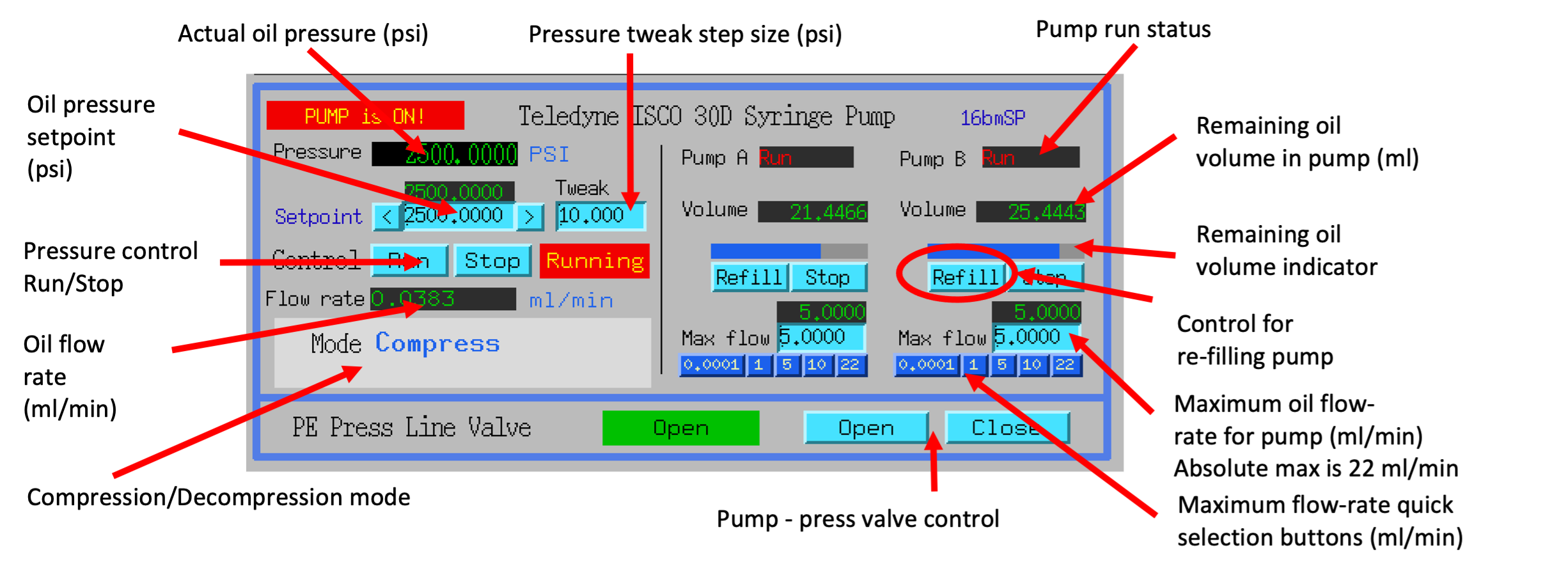
The PEC oil pressure is controlled by the Teledyne ISCO 30D dual syringe pump system.
The maximum pressure allowed is 12,000 psi (9,000 psi for ultrasound or grooved cells).
Syringe pump is controlled through the MEDM interface
Basic pump operation
Procedure for increasing, maintaining, and decreasing pressure.
Warning
Due to a problem with the pump controller, sometimes communication with the pump
gets lost and the indicators colors will change to white.
If this happens, please wait around 1-2 minutes, the communication should get re-established on its own.
Afterwards, you may need to re-do the last command.
Stop the Pressure Control before switching Mode. (Mode button is hidden while Pressure Control is in “Run” state).
Refill pumps A and B (click the button Refill for each pump).
Note
Wait until both pumps finish refilling.
Set Max flow for both pumps to 5ml/min.
Set the Oil pressure setpoint to 20 psi.
Set Pressure control to Run. Pump will go through the initial equalization sequence; this will take around 30 seconds to one minute.
Note
Pressure may go up to ~80 psi and fluctuate somewhat during this process.
Wait until the Actual oil pressure stabilizes at 20 psi.
Increase the Oil pressure setpoint to your required pressure (maximum allowed is 12,000psi for standard anvils, 9,000psi for grooved and ultrasonic anvils). Pump will gradually reach the setpoint pressure and maintain the pressure continuously.
If you don’t want the pump to maintain the pressure continuously after reaching the setpoint, set the Maximum oil flow-rates for pumps A and B to 0.0001 ml/min.
Important
DO NOT switch Pressure Control to Stop.
To reach the next oil pressure setpoint, re-enable pressure control by setting Max flow rates back to 5 ml/min.
Set Pressure Control to Stop. If the Stop button is missing, it means the line valve of the press is still open and the pressure is too high to safely switch to Decompress mode. Please close the line value and the Stop button will reappear.
Set Mode to Decompress.
Set Pressure Control to Run.
Important
Wait around 1 minute before doing anything else.
After around 30 seconds, one of the pumps (A or B) will start emptying out (there will be a valve opening/closing sound).
Wait until the level in that pump reaches around 7.5 ml.
Ensure the pressure of the pump is within 100 psi of the line valve pressure, then open the line valve.
Set the setpoint pressure to 20 psi.
After the actual oil pressure is at 20 psi, switch pressure control to Stop.
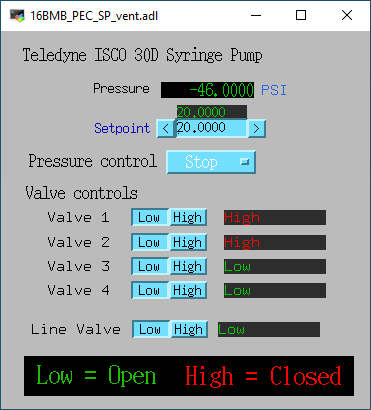
Open the valves to vent the remaining oil pressure:
Open valve control from the main PEC interface menu “Pump control menu”
Toggle Valves 1-4 to Low.
Note
If the readback text for a valve is high (red), and pressed button is low: click the high button and then the low button.
Note
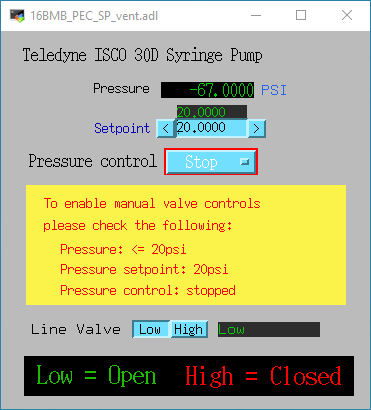
If the valve 1-4 buttons are hidden check the following conditions are met:
The Live valve is an electronically actuated valve in-line between the Syringe pump and the PE press.
The Line valve allows to keep the pressure in the PE press isolated from the Syringe pump when changing modes
(Compression <-> Decompression), when heating, or when leaving the PE press unattended for an extended perions of time.
The line valve should also be closed following an experiment when the sample has been removed to keep the bottom piston from being popped out of the PE press. This is explained in more detail in the following section.